
Gameplay
ReStory Guitar Firmware: Guitar Legend Fix Guide
Direct answer
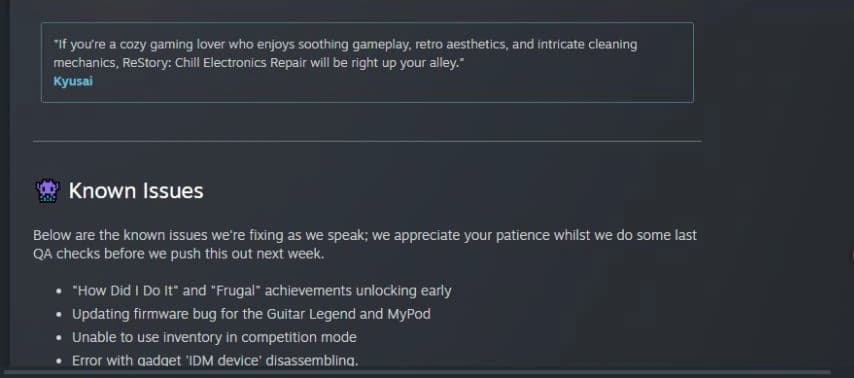
If Guitar Legend cannot complete its firmware update in ReStory, this was a confirmed bug rather than proof you missed a repair step. The official Known Issues announcement listed Guitar Legend and MyPod firmware problems, and the official v1.0.009r announcement on August 11 says the firmware update bug was fixed. Preserve the affected save, update the unmodified game, check the normal workflow once, and record whether the affected save now completes; the public sources do not promise retroactive order completion or universal mod compatibility.
Is the Guitar Legend firmware bug confirmed?
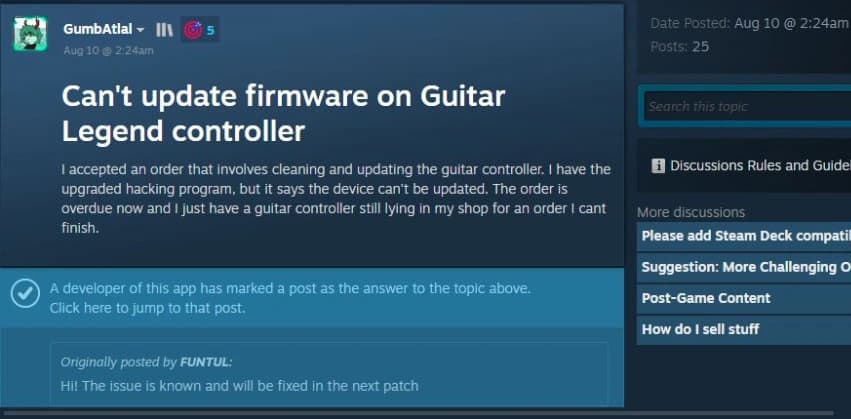
Yes. In a Steam discussion specifically about the Guitar Legend controller, a developer-marked answer says the issue was known and would be fixed in the next patch. The official Known Issues announcement lists an “Updating firmware bug for the Guitar Legend and MyPod,” and the later official v1.0.009r announcement says that firmware bug was fixed. These dated records confirm both the launch diagnosis and the published fix statement.
The reports describe a controller that has already been cleaned, repaired, and assembled but still cannot enter the firmware process. Some affected orders then remain incomplete because UPDATE FIRMWARE cannot be crossed off before the deadline.
Check the normal ReStory firmware workflow first
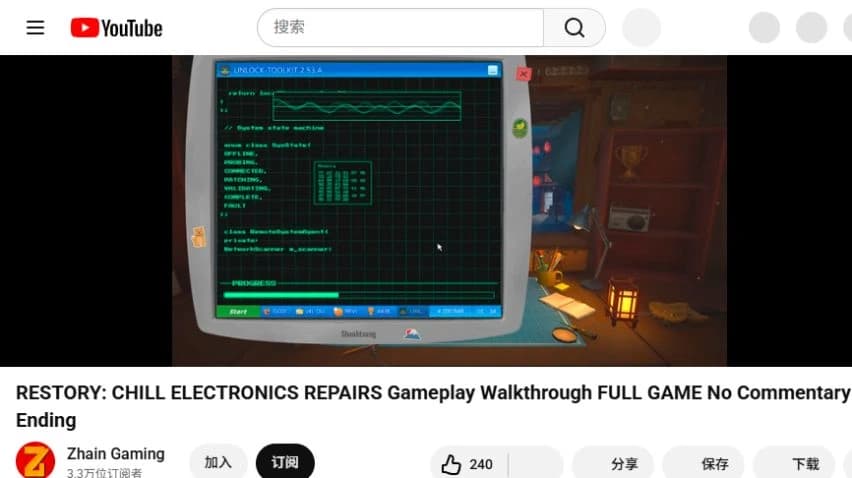
Start with the paper order and confirm that UPDATE FIRMWARE is actually one of the requested services. Finish the listed cleaning and repair work, fully reassemble the device, and leave it on the main workbench instead of packing it early. Open Unlock-Toolkit on the shop computer only after those physical steps are complete, because this separates a missing prerequisite from the known controller-specific failure.
A normal supported device should reach a ready state, show the code-entry interface, and advance through a visible progress sequence. Enter the displayed code until the tool reports success, then return to the order card and verify that the firmware service is crossed out. The checked full-game recording shows this ordinary flow on another device, so it is useful as a comparison rather than evidence that Guitar Legend itself can currently finish the same sequence.
How to identify the Guitar Legend controller failure
Treat the known bug as the leading explanation when Unlock-Toolkit says connecting the device is not possible, never recognizes the controller, or cannot start the firmware minigame. The comparison becomes stronger when phones or other supported devices update normally in the same save while Guitar Legend does not. Multiple Steam threads describe this contrast, including players who had already repaired the device and bought an upgraded toolkit.
Do not assume that purchasing the highest Unlock-Toolkit tier is a verified fix. Players reported the same Guitar Legend or MyPod failure after upgrading, and the developer still classified the behavior as a bug requiring a patch. Repeatedly reopening the tool, buying another controller, disassembling the customer item again, or reloading without a documented reason also lacks reliable two-source support.
Official patch status on August 19, 2026
The official v1.0.009r announcement on August 11 says the Guitar Legend and MyPod firmware update bug was fixed. The public announcement identifies the release version but does not promise that every existing overdue order will be repaired automatically. Treat “official fix announced” and “affected save independently retested” as separate statuses.
The safe current conclusion is that an official fix was published, while the exact behavior of saves that already contain an overdue order remains unconfirmed. Recheck the official news and the unmodified current build after preserving the affected save.
Safest next steps after the patch
Save the game and keep a backup that still contains the affected order before trying any unofficial change. Let Steam install v1.0.009r or a later official build, repeat the normal preparation once, and confirm whether Unlock-Toolkit now recognizes Guitar Legend and completes the service on the affected save.
There is no collected official promise to reset an expired timer, refund an order, remove a negative review, or restore lost reputation. Avoid deliberately expiring the job, selling the customer device, stripping it for parts, or discarding it as a supposed workaround. Those actions may create a separate save-state problem and are not supported by the developer statements used for this guide.
Community Firmware Fix mod: what is verified
A community-made Firmware Fix mod exists for the Guitar and MyPod classification problem. Its public GitHub README currently identifies it as version 1.0.0, describes a BepInEx plugin that changes the game’s HackingContentTable lookup, and documents a fallback to phone data when the original category is unknown. Nexus Mods and linked Steam discussion reports may provide additional user feedback, but they do not establish universal compatibility.
The mod is not an official ReStory patch and should not be presented as developer-approved. It changes internal game logic, depends on a third-party loader, and may stop working after the game updates. To be confirmed: compatibility with every current build, effects on achievements or saves, and whether the author will update it after the official fix.
Installing the unofficial mod carefully
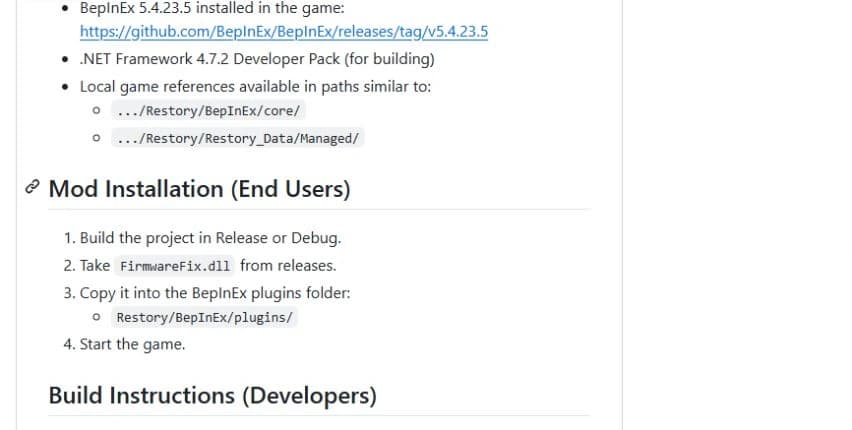
The collected installation instructions apply to the Windows version and specify BepInEx 5.4.23.5. Back up the save and game directory first, then open ReStory’s installed files from Steam and place the matching BepInEx files in the game root. Launch once so BepInEx creates its folders, exit, and copy FirmwareFix.dll into Restory/BepInEx/plugins/ before starting the game again.
If the plugin does not load, confirm that the DLL is inside the plugins directory and inspect the BepInEx log for a loading error. Do not describe a Nexus safety label as a developer audit, and do not promise that the mod cannot affect saves, achievements, or future patches. When an official patch arrives, back up again, remove FirmwareFix.dll temporarily, update the game, and test the unmodified official build first.
What does not have reliable evidence
No reliable paired sources show that repeatedly opening Unlock-Toolkit, reinstalling the game, reloading the same save, or buying another Guitar Legend consistently resolves the problem. The same is true for purchasing the most expensive toolkit solely to clear this order. These actions may change unrelated conditions, but they should not be published as a confirmed Guitar Legend controller firmware fix.
The evidence also does not support claims about compensation after the patch. No checked official source promises deadline resets, refunds, automatic reputation recovery, or retroactive order completion. Mark those outcomes as to be confirmed until a patch note or developer announcement states exactly what happens to already affected saves.
Guitar Legend firmware questions answered
Is the bug official? Yes: a developer reply and the official Known Issues post identify the firmware problem. Has an official fix shipped? Yes: the v1.0.009r announcement says the Guitar Legend and MyPod firmware update bug was fixed. Does upgrading Unlock-Toolkit alone solve it? There is no reliable evidence that it does.
Is every affected save confirmed fixed? No. The checked sources do not promise retroactive order completion or universal compatibility with every save. Is there a workaround? The official sources provide no universal workaround; the community mod remains unofficial, build-dependent, and appropriate only after a backup and a clear understanding of the risk.
Sources checked August 19, 2026
See the editorial and sourcing policy for verification, corrections, community evidence, and media-use rules. Report a correction.